Exhibit vs Decipher TextMessage
Decipher TextMessage is a long-standing desktop app for saving and printing iPhone texts, often recommended for court and business records. Exhibit aims at the same job from the other side: the iPhone itself. Both are one-time purchases; they differ in where they run and what they include.
Short answer
Pick Decipher TextMessage if you have a Mac or PC, are comfortable making an iPhone backup, and need iMessage photos and other attachments inside the PDF. Pick Exhibit if you want to export a conversation without a computer, in about 5 minutes, as a numbered PDF with an integrity page and an optional signed declaration, and you can save photos separately.
On this page
| Feature |  Exhibit Exhibit |  Decipher TextMessage Decipher TextMessage |
|---|---|---|
| Where it runs | On the iPhone | On a Mac or PC |
| How it reads messages | Free Exhibit shortcut (Apple Shortcuts) | From an iPhone backup on the computer |
| iMessage photos and videos | Listed, not included | Included in the PDF |
| Yes, from WhatsApp's own export | Not in this app | |
| Output | Numbered PDF, CSV, TXT | PDF, CSV, HTML, text |
| Integrity page and declaration | Yes, SHA-256 and optional signature | Not in the same form |
| Time for one conversation of about 500 messages | About 5 minutes | Backup first, then minutes |
| Price | $9.99 per conversation or $29.99 lifetime, one-time | $29.99 one-time, two devices |
How Decipher TextMessage works
You install the app on a Mac or Windows PC, connect the iPhone and make a backup, or point the app at an existing one. It then lists every conversation in that backup. You pick one, choose a date range if you want, and save or print it as a PDF that looks like the iPhone’s Messages screen, with photos and attachments included. Because it reads a backup, it can sometimes show messages that were deleted but are still in that backup.
How Exhibit works
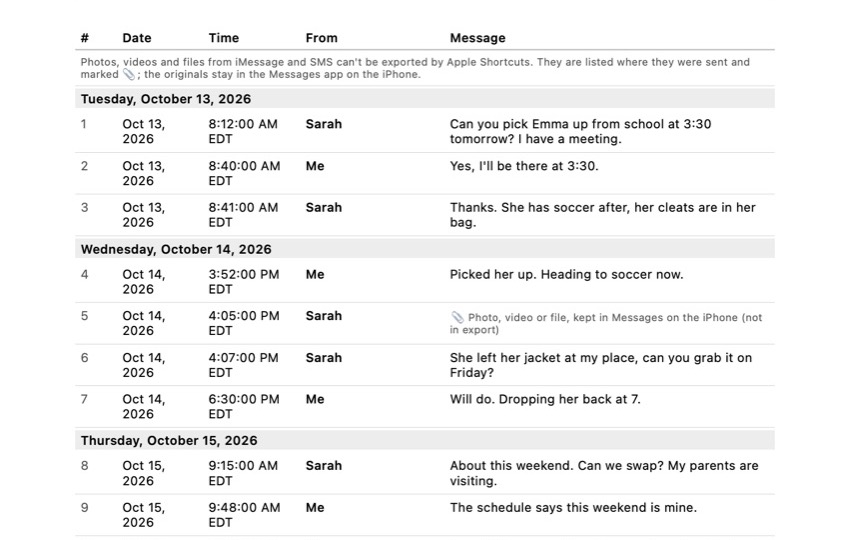
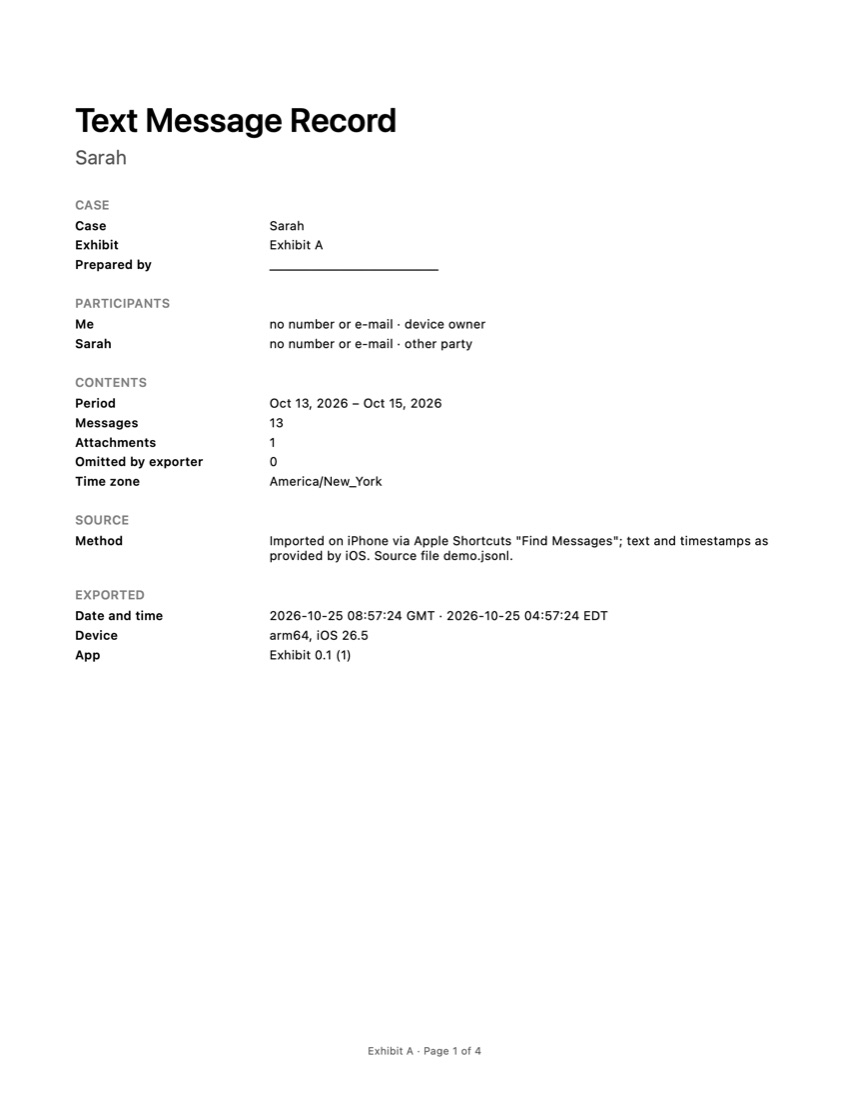
Exhibit works on the iPhone. You add the free Exhibit shortcut once, choose the conversation and the period, and export a PDF, CSV or TXT. WhatsApp chats come in through WhatsApp’s own Export Chat. The PDF is a numbered table with dates, times and senders, a cover page, “Page X of Y”, and an integrity page with SHA-256 fingerprints and a declaration you can sign with your finger.
The real differences
Computer and backup. Decipher needs a computer and a backup; a first backup of a full iPhone can take a while. Exhibit needs neither.
Attachments. Decipher includes iMessage pictures in the PDF. Exhibit cannot, and says so in the record; save important photos separately.
WhatsApp. Exhibit handles WhatsApp in the same app. Decipher TextMessage is for Messages.
Price. Both are one-time purchases. Decipher is $29.99 for two devices; Exhibit is $9.99 per conversation or $29.99 for all.
Which one should you pick?
Think about the photos first. If the pictures sent in an iMessage thread are what the case is about, Decipher TextMessage puts them in the PDF next to the text, and that is worth the trip to a computer. If the words, dates and times are what matter, Exhibit is quicker: no backup, no cable, and a record that states its own period, time zone and page count.
Then think about where you are. Decipher fits a desk with a Mac or PC and an hour to spare for a first backup. Exhibit fits a phone in your hand and a lawyer who asked for the conversation this afternoon. Both are paid once, so neither locks you into a subscription. If you are not sure, Exhibit’s free preview lets you import the conversation and check it before you pay anything.
If you only need a few messages
For two or three messages, neither app is necessary. A screenshot with the times revealed, or a printout from a Mac, can be enough; our guide on printing text messages from an iPhone shows each free method and its limits. To keep texts from disappearing before you need them, set Keep Messages to Forever, as explained in how to save text messages on an iPhone.
Where Decipher TextMessage is the better choice
- Includes photos, videos and other attachments in the PDF.
- Can show some deleted messages that are still in a backup.
- Works with older iPhones and iOS versions, as long as you can make a backup.
Frequently asked questions
Do I need a backup to use Decipher TextMessage?
Yes. It reads messages from an iPhone backup on your Mac or PC, which the app can make for you or which you make with Finder or iTunes. Exhibit does not need a backup; it reads the conversation on the iPhone through Apple Shortcuts.
Which one includes pictures?
Decipher TextMessage includes MMS and iMessage attachments in its PDF. Exhibit lists iMessage attachments where they were sent but cannot include them, because Apple Shortcuts does not allow it. WhatsApp exports with media can include photos in Exhibit.
Is either one accepted by courts?
No tool can promise that. Whether a court accepts a printout depends on the court, your jurisdiction and how the record is presented. Both tools produce a readable record; ask your lawyer what they need.
Sources
Export the whole conversation
Exhibit turns an iMessage, SMS or WhatsApp conversation into one PDF with every date, time and sender, right on your iPhone. No computer, no account.
Get Exhibit, free download