Exhibit vs iMazing
iMazing is the best-known desktop tool for managing an iPhone, and exporting messages is one of many things it does. Exhibit does one thing: turn a conversation into a clean record on the iPhone itself. Which one you want depends on whether you have a computer at hand and how many conversations you need.
Short answer
Pick iMazing if you have a Mac or PC, need many conversations or full iPhone backups, and want iMessage photos included in the export. Pick Exhibit if you need one or a few conversations as a numbered PDF with dates, times and senders, without a computer or cable, in about 5 minutes, and want a one-time payment instead of a yearly subscription.
On this page
| Feature |  Exhibit Exhibit |  iMazing iMazing |
|---|---|---|
| Where it runs | On the iPhone | On a Mac or PC, iPhone connected |
| Needs a computer | No | Yes |
| iMessage and SMS | Yes | Yes |
| Yes, from WhatsApp's own export | Yes | |
| iMessage photos and videos | Listed, not included | Included |
| Output | Numbered PDF, CSV, TXT | PDF, text, Excel/CSV, RSMF |
| Integrity page and declaration | Yes, SHA-256 and optional signature | Not in the PDF |
| Time for one conversation of about 500 messages | About 5 minutes | Setup and backup first, then minutes |
| Price | $9.99 per conversation or $29.99 lifetime, one-time | Subscription: about €50 a year for up to 5 devices, €80 for up to 20 |
How iMazing works
You install iMazing on a Mac or Windows PC, connect the iPhone with a cable or over Wi-Fi, and let it read the device, usually by making a backup first. Then you browse to Messages, pick one or more conversations and export them as PDF, text, Excel/CSV or RSMF. The PDF looks like the Messages app, with bubbles, and attachments can be exported alongside.
It is a capable, general tool. That is its strength and its cost: there is setup, a first backup can take a while on a full iPhone, and the price is a yearly subscription.
How Exhibit works
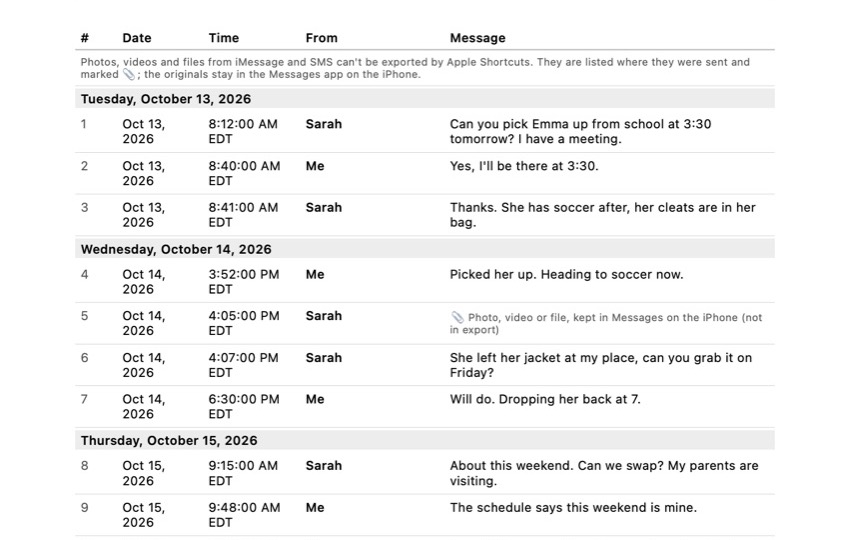
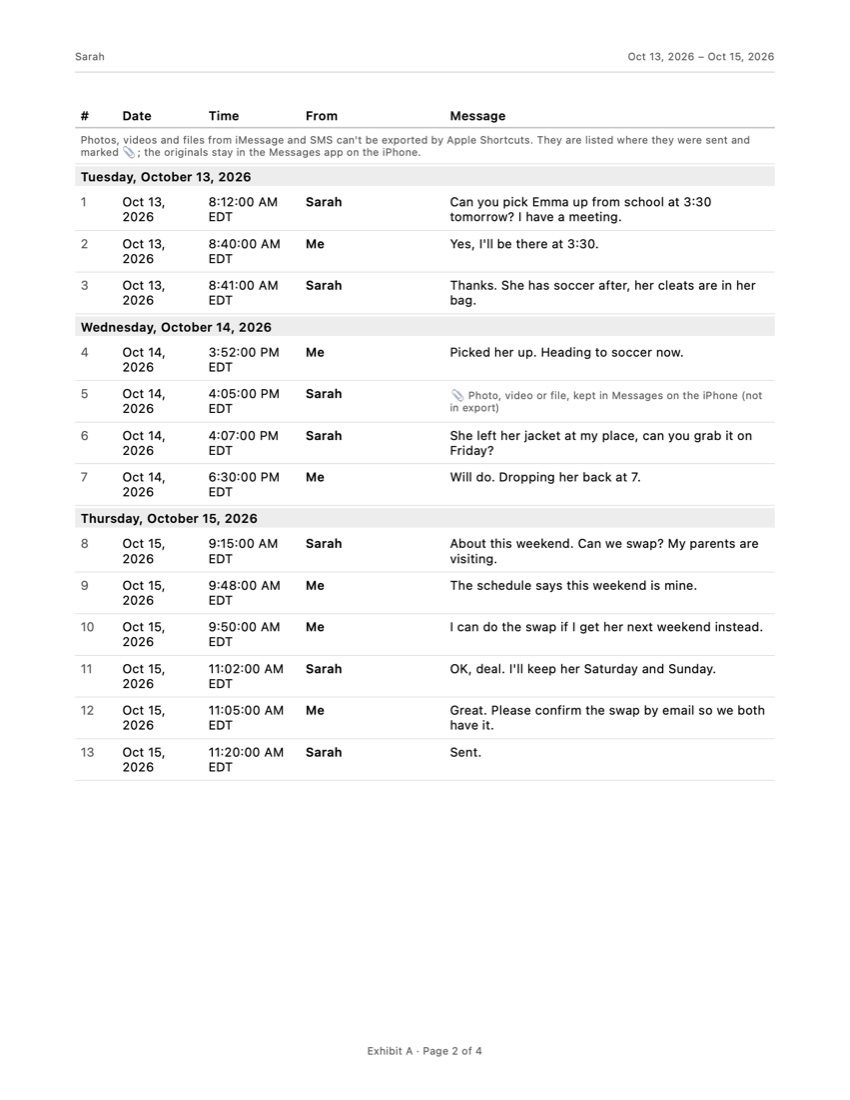
Exhibit runs on the iPhone. You add the free Exhibit shortcut once, pick the conversation and the period, and export. For WhatsApp you use WhatsApp’s own Export Chat and open the file in Exhibit. The result is a table, not bubbles: every message numbered with date, time and sender, a cover page, “Page X of Y” on each page, and an integrity page with SHA-256 fingerprints and a declaration you can sign.
The honest limit: Apple Shortcuts does not let apps read iMessage attachments, so Exhibit marks where each photo or file was sent instead of including it.
The real differences
Computer or not. If you are on the go, or the person asking for the messages wants them today, Exhibit needs nothing but the phone. iMazing needs a computer and some time.
One conversation or everything. For a single conversation, Exhibit is the shorter path. For dozens of conversations, full backups or app data, iMazing does more.
Photos. If the pictures in an iMessage thread are central, iMazing includes them. With Exhibit you save those photos separately.
Paying. Exhibit is a one-time payment: $9.99 per conversation or $29.99 once for all. iMazing is a subscription of about €50 a year for up to 5 devices, which renews until you cancel.
Which one should you pick?
Start with what the person asking for the messages needs. If they want one conversation, readable, with every date and time and a clear page count, Exhibit gets you there on the phone in about 5 minutes, and the PDF explains itself with a cover page and an integrity page. If they want every photo inside the record, or many conversations at once, iMazing on a computer is the better tool, and it is worth the setup.
You can also combine them: export the conversation with Exhibit to read and share it quickly, and save the photos that matter separately from Messages. Whatever you choose, keep the original conversation on the phone. An export is a copy; the phone is what can be checked if anyone questions the record.
Other ways to get your messages out
Not sure you need an app at all? Our guides compare the free routes too: printing text messages from an iPhone with screenshots or a Mac, and downloading them to a computer with a backup or iCloud. Each one shows what you keep, what you lose and how long it takes for about 500 messages.
Where iMazing is the better choice
- Includes iMessage photos, videos and other attachments in the export.
- Exports many conversations at once, and does much more: backups, file transfer, app management.
- Offers RSMF, a format used in e-discovery, if your lawyer's review software asks for it.
Frequently asked questions
Is there an iMazing alternative that works without a computer?
Yes. Exhibit runs on the iPhone: it reads the conversation through a free Exhibit shortcut for Apple Shortcuts and exports it there. The trade-off is that iMessage photos are listed rather than included.
Does iMazing cost money to export messages?
Yes, after the free trial. In October 2026 iMazing's store listed a Personal subscription at €49.99 a year for up to 5 iPhones and iPads, and €79.99 a year for up to 20; prices may differ by country. You can install it on as many Macs and PCs as you like.
Which one is better for a lawyer?
Ask what format they want. If they need every photo or an e-discovery format, iMazing fits better. If they want one readable, numbered transcript of a conversation, Exhibit's PDF with its integrity page is made for that. Neither tool decides what a court accepts.
Sources
Export the whole conversation
Exhibit turns an iMessage, SMS or WhatsApp conversation into one PDF with every date, time and sender, right on your iPhone. No computer, no account.
Get Exhibit, free download