 Exhibit
What is in an Exhibit PDF
When you hand a conversation to a lawyer, HR or a landlord, the format matters almost as much as the messages. A pile of screenshots raises questions: what is missing, when was this sent, who said what. The Exhibit PDF is built to answer those questions on the page itself.
Short answer
An Exhibit PDF has four parts: a cover page with the participants, the period and the time zone; a transcript with every message numbered, dated, timed and attributed to its sender; an index of attachments; and an integrity page with SHA-256 fingerprints and a declaration you can sign in the app. Every page carries a header and "Page X of Y", so nothing can quietly go missing.
On this page
The cover page
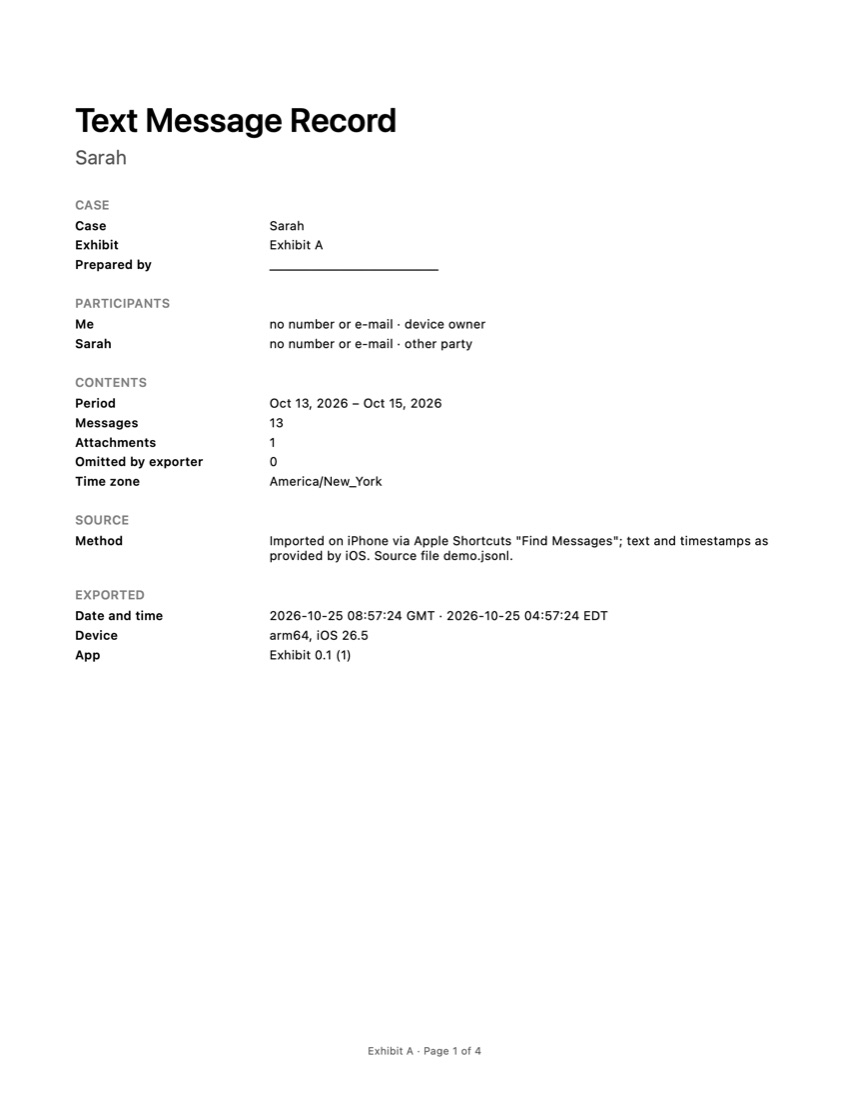
The first page says what the document is before anyone reads a single message: the conversation name, the participants with their phone numbers or email addresses where Exhibit knows them, the period, the number of messages and attachments, how many messages were left out, and the time zone used. It also records how the messages were exported (through Apple Shortcuts on the iPhone) and when.
The transcript
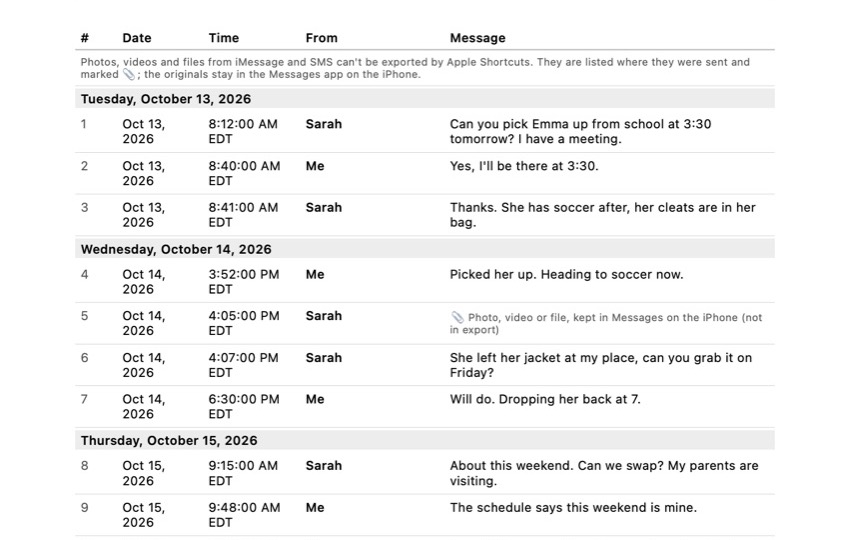
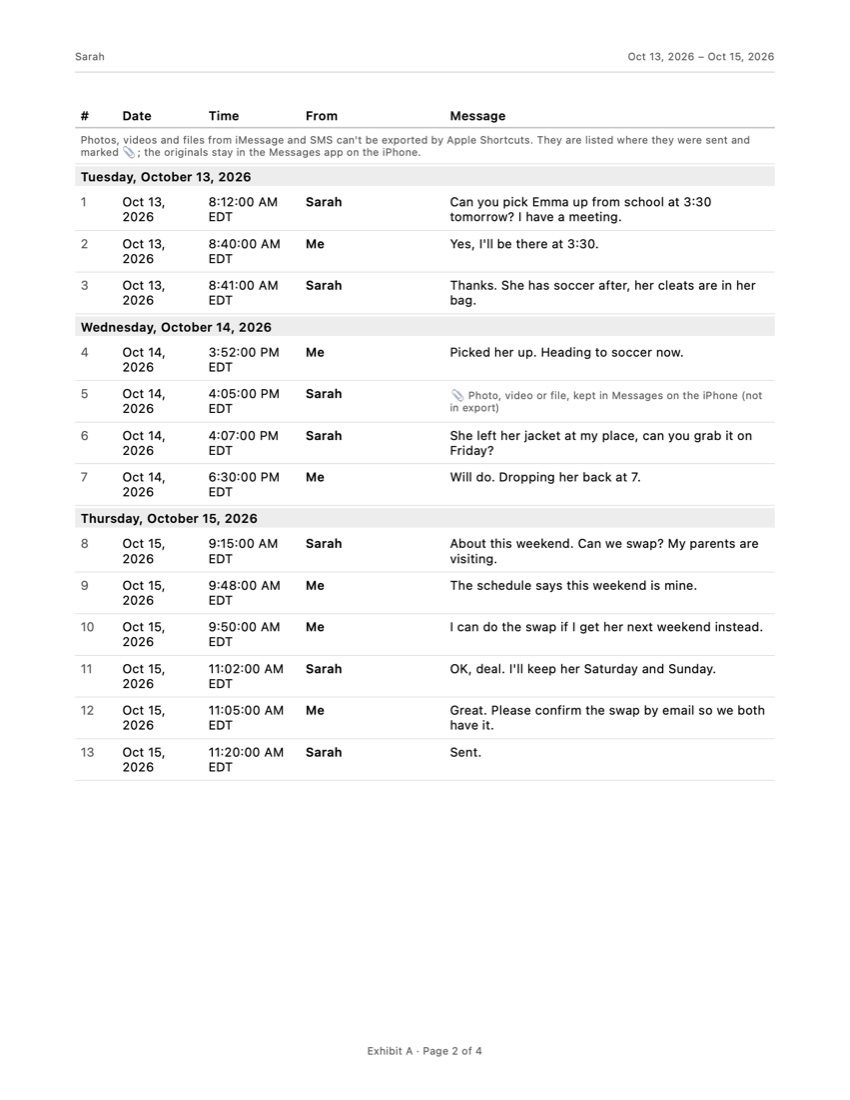
Every message gets its own row: a number, the date, the time, the sender and the text. Days are separated by a date heading. A message is never split over two pages unless it is longer than a whole page, so a page break never cuts a sentence in half.
Numbering matters more than it looks. When a lawyer writes “see message 87”, everyone looks at the same line. With screenshots, people end up pointing at “the third bubble on the fifth image”.
Attachments
For WhatsApp chats exported with media, photos and other files can be included and are listed in the attachment index. For iMessage and SMS, Apple Shortcuts does not let apps read attachments, so Exhibit marks each one in the transcript where it was sent, with a paperclip and a note, and lists it in the index. The record shows that something was sent at that moment; the original stays in Messages on the iPhone.
The integrity page
The last page explains what SHA-256 fingerprints are and prints two of them: one for the source data as it was imported, and one for the content of the record. Change a single character and the fingerprint changes completely. The PDF’s own fingerprint is saved in a separate .sha256 file next to the PDF and shown in the app.
Below that is a short declaration that the messages were exported from your own device and not altered, with lines for your name, date and signature. You can sign it with your finger in the app, or leave the lines blank and sign with a pen. The page ends with a plain reminder that a court decides what evidence it accepts and that Exhibit does not give legal advice.
CSV and TXT
The same conversation can also be exported as CSV, for a spreadsheet where you can sort and filter, or as a plain TXT file that opens anywhere. The PDF is for people; the CSV is for anyone who needs to count, search or analyse.
When this format helps
The PDF is made for the moment a conversation leaves your phone: printing it for a meeting, sending it to a lawyer, or keeping a copy on a computer. Our guides on printing text messages from an iPhone and downloading them to a computer compare this route with screenshots and a Mac, including how long each one takes.
Frequently asked questions
Can I choose which messages go into the PDF?
Yes. You pick the period, and you can leave single messages out by swiping left on them in the app. The cover page then states how many messages were left out, so the reader knows the record is a selection.
What time zone does the PDF use?
The time zone of the conversation as it was on your iPhone, and the PDF says which one. That avoids the classic confusion when the people in a dispute live in different states.
Can the PDF be changed after export?
Any PDF can be edited with the right software. What the SHA-256 fingerprints do is make a change visible: if anyone recalculates the fingerprint of the content and it no longer matches the one printed on the integrity page, the record was altered.
Is the PDF formatted like the Messages app?
No. It is a table, not chat bubbles, because a table is easier to read, quote and refer to: "message 214, March 4, 9:41 PM" is a precise reference in a letter or a meeting.
Sources
Export the whole conversation
Exhibit turns an iMessage, SMS or WhatsApp conversation into one PDF with every date, time and sender, right on your iPhone. No computer, no account.
Get Exhibit, free download