How to prove harassment at work: saving texts and messages for HR
A manager or coworker sends you messages that cross a line: comments about your body, insults, pressure, threats after you said no. In the meeting room it would be your word against theirs, but texts are different: they are written down. The question is how to keep them, and how to show them to HR in a way nobody can wave away.
Short answer
Write it down and keep it. Save every text or WhatsApp conversation with the person, the whole thread and not only the worst lines, with the date, time and sender on every message. Keep a dated log of what happened in person and who saw it. Report it in writing, following your employer's harassment policy, and keep a copy. Store your copies somewhere you keep if you leave the job. Whether it is unlawful harassment depends on the facts and the law; an employment lawyer or the EEOC can tell you.
On this page
Which way of keeping work messages holds up best with HR?
 ExhibitExhibitPDF export
Showing your phone in a meeting leaves HR with nothing on file, and forwarding to a work address puts your evidence in an account you lose when you leave. Screenshots are fine for a handful of messages, but 500 messages is about 50 screenshots, roughly an hour or more. An export takes about 5 minutes and HR can keep it.
Export the conversation with Exhibit
What to do now
Do not delete anything, including your own replies. Save a complete copy of each conversation with the person, start a dated log, and note the names of anyone who saw or heard something.
What not to rely on
HR asking the harasser for the messages, a work phone or work account you can lose access to overnight, a few cropped screenshots, or a verbal complaint nobody wrote down.
What Exhibit does
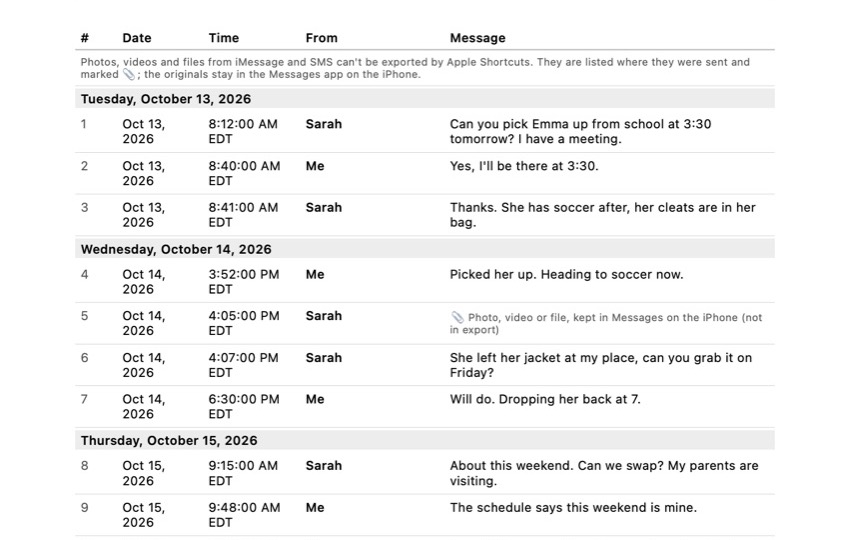
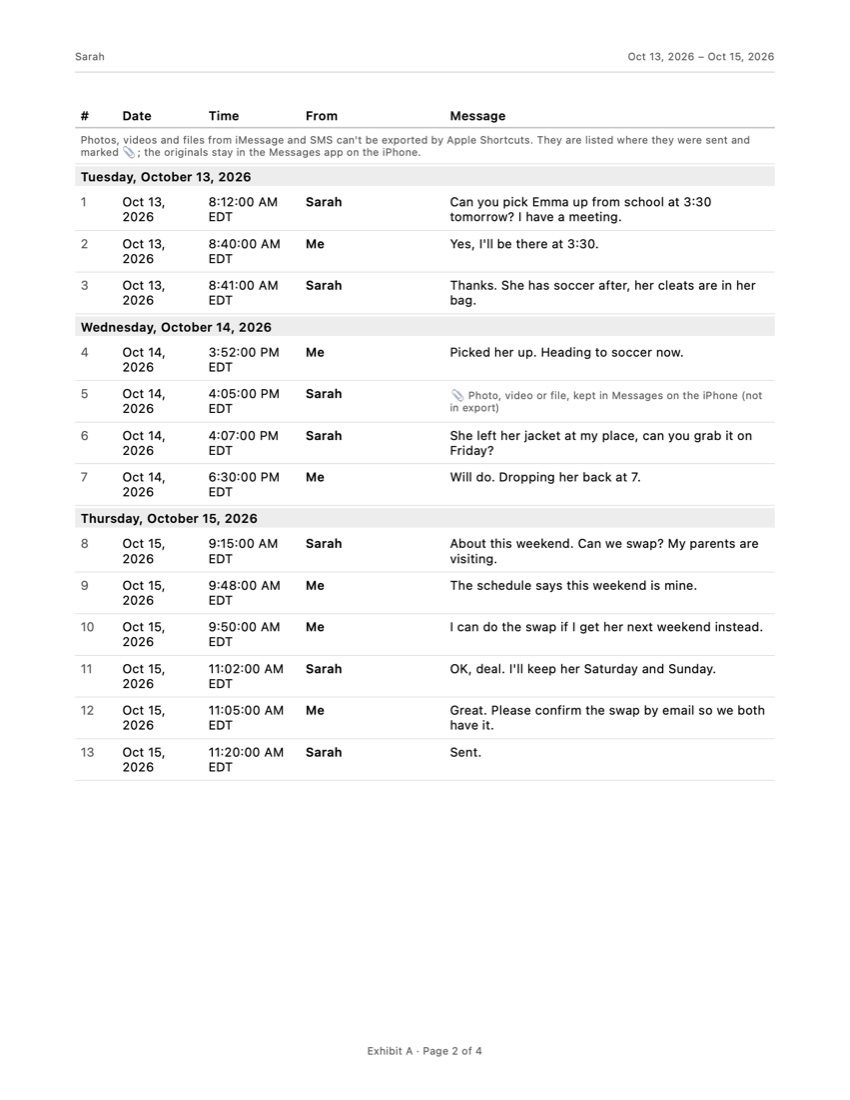
Exports one iMessage, SMS or WhatsApp conversation for a period you choose to a PDF, CSV or TXT file on your iPhone. The PDF numbers every message with its date, time and sender, states the time zone, has page numbers and an integrity page with SHA-256 fingerprints. Processed on your iPhone, not uploaded.
What Exhibit does not do
Export Slack, Teams or work email, export iMessage and SMS photos and videos (the PDF lists where each one was), judge whether something is harassment, or give legal advice.
What a lawyer decides
Whether the conduct is unlawful harassment, which deadline applies to an EEOC or state charge, what to do if you face retaliation, and what you may keep from work systems.
What to keep
Your copies on a personal device or account, your log, a copy of your written complaint and HR's replies, and the dates of every meeting.
The problem
Workplace harassment is often hard to prove because much of it happens in person, without witnesses. Messages are the exception. A text or WhatsApp message shows who sent it, what it said and when, and a thread of them shows how often it happened and whether it continued after you objected.
The EEOC describes unlawful harassment as unwelcome conduct based on a protected characteristic, such as sex, race, religion, disability or age, that is severe or pervasive enough to create an intimidating, hostile or abusive workplace, or that you have to put up with to keep your job. Petty slights and one-off comments usually do not meet that bar on their own. That is why the pattern matters, and why saving the whole conversation, not just the worst message, is so useful.
What can go wrong
- Deleting your own replies. A thread with gaps invites the question of what you removed. Keep your side too, even the angry or friendly-sounding parts.
- Evidence on a work device. A company phone or account can be locked or wiped the day you leave, and you may not be allowed to copy from it. Ask a lawyer before you do.
- Cropped screenshots. The other side may say the message was a joke taken out of context. A complete thread answers that.
- Only a verbal complaint. If you told your manager in a hallway, there may be no record that the company knew.
- Waiting too long. The deadline for an EEOC charge is generally 180 days, sometimes 300, and an internal HR process does not stop it.
- Messages in other apps. Harassment in Slack, Teams or work email lives on your employer’s systems. Those need their own approach.
Checklist
- Do not delete anything in the conversation, and set Settings > Apps > Messages > Keep Messages to Forever. Our guide on saving text messages on iPhone explains this and backups.
- Save every conversation with the person as a complete copy, with dates, times and senders, and store it on a personal device or account.
- Save photos, voice messages and call logs from those conversations separately.
- Keep a log: date, time, place, what happened, who saw it, and how it affected your work.
- Read your employer’s harassment policy to see who handles complaints. If that is the person harassing you, it should name someone else.
- Report it in writing (email or letter), attach or offer your copies, and keep a copy of what you sent.
- Write down what happens next: meetings, replies, changes to your schedule or duties.
- Check your deadline with the EEOC or your state agency, and consider talking to an employment lawyer.
Bringing the messages to HR
HR usually wants something it can put in a file and share with the investigator, not a phone passed across the desk. Our guide on downloading text messages from an iPhone compares the ways to get a conversation out of Messages.
Exhibit exports one conversation at a time on the iPhone, without a computer. For iMessage and SMS you add the free shortcut once; for WhatsApp you use WhatsApp’s own Export Chat and open the file in Exhibit. You choose the period and get a PDF with every message numbered, with its date, time and sender, the time zone, “Page X of Y” on every page, and an integrity page with SHA-256 fingerprints so anyone can check later that the file was not changed. If a few messages are private and unrelated, you can leave them out, and the cover page states how many were omitted. Your conversations are processed on your iPhone and are not uploaded.
The limits: photos, videos and files in iMessage and SMS cannot be exported through Apple Shortcuts, so the PDF lists where each one was and you save them separately. Exhibit does not export Slack, Teams or email. It is free to download, does not give legal advice and does not decide whether something counts as harassment.
What if HR does not act, or you are punished for reporting?
Your employer is expected to look into a complaint and take prompt action when harassment happened. If nothing changes, or you are suddenly moved, cut out of meetings or disciplined after you complained, write each event down with the date. Retaliation for reporting harassment is prohibited under federal law. You can contact the EEOC (free, no lawyer needed) or your state’s fair employment agency, and an employment lawyer can tell you which deadline applies and what your options are where you live.
Frequently asked questions
Do text messages count as proof of harassment at work?
They are often some of the clearest records, because they show who wrote what and when. HR, the EEOC or a court will look at them together with everything else: how often it happened, what was said in person, and witnesses. A single rude message is usually not enough on its own; a pattern carries more weight.
Should I report it even if it happened only once?
The EEOC recommends reporting harassing conduct even when it seems minor or happened once, so your employer can stop it early. Isolated incidents are generally not illegal unless they are very serious, but reporting creates a record if it continues.
Is there a deadline?
Yes. To file a charge with the EEOC you generally have 180 calendar days from the incident, extended to 300 days where a state or local agency enforces a similar law. Federal employees have 45 days to contact an EEO counselor. Do not wait for HR to finish before checking your deadline.
Can my employer punish me for reporting?
Retaliation for reporting harassment or taking part in an investigation is prohibited under federal law. If you are moved, cut out or disciplined after you complained, write it down with dates and tell an employment lawyer or the EEOC.
Can I save messages from my work phone or work chat?
Be careful. Work phones and company accounts belong to your employer, and copying company information can break your employment rules. Messages sent to you, about you, are different from company files, but ask an employment lawyer before you copy anything from work systems.
Sources
Export the whole conversation
Exhibit turns an iMessage, SMS or WhatsApp conversation into one PDF with every date, time and sender, right on your iPhone. No computer, no account.
Get Exhibit, free download