What evidence do you need for a restraining order? Texts and messages
Someone has threatened, followed or frightened you, and much of it happened by text. You are thinking about asking a court for a restraining order, or you already have a hearing date, and you wonder what counts as proof and how to show the messages to a judge.
Short answer
If you are in danger, call 911. You do not need a stack of documents to ask for a restraining order: your own sworn statement, with dates and details, is evidence. Messages make it stronger. Keep every text, voicemail and photo, do not reply, and save a copy of each conversation with the date, time and sender on every message. Print it for the hearing (some courts ask for 3 copies) and keep the phone. What is enough is decided by the judge and your state's law.
On this page
How should you bring threatening texts to the hearing?
 ExhibitExhibitPDF export
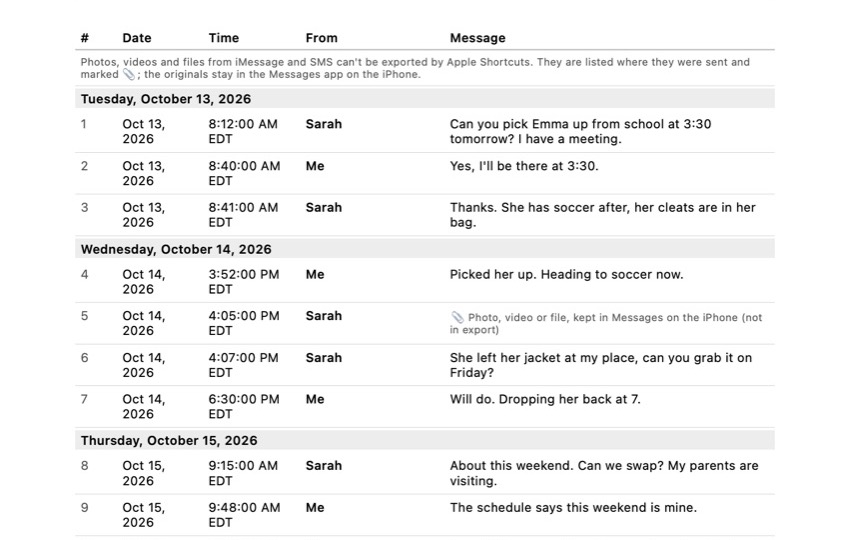
For two or three threatening texts, screenshots that show the time are enough. For weeks of messages, 500 messages means about 50 screenshots and roughly an hour or more, and you have to do it again when new messages arrive. An export takes about 5 minutes per conversation and is easy to print in three copies. Keep the phone either way.
Export the conversation with Exhibit
What to do now
If you are in danger, call 911 or a domestic violence hotline. Then stop anything that deletes messages (Keep Messages: Forever), save each conversation with the person, and write down the dates of every incident while you remember them.
What not to rely on
Telling the judge "he texts me all the time" without the messages, a contact name instead of the phone number, one screenshot of the worst text, or the messages staying on your phone until the hearing.
What Exhibit does
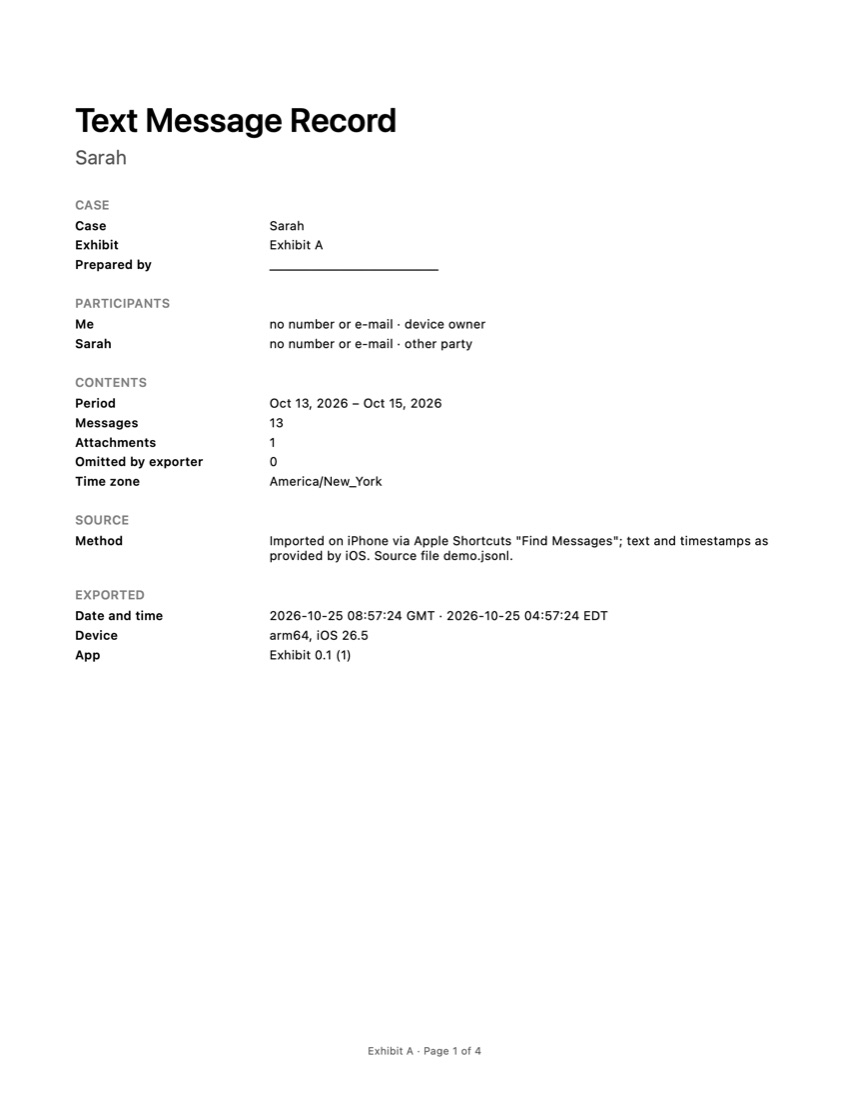
Turns one iMessage, SMS or WhatsApp conversation, for a period you choose, into a PDF with every message numbered with its date, time and sender, the time zone stated, page numbers and an integrity page with SHA-256 fingerprints. Processed on your iPhone, not uploaded.
What Exhibit does not do
Give legal advice, fill in court forms, decide whether you qualify for an order, or export photos and videos from iMessage or SMS (the PDF lists where each one was). It does not replace a lawyer, an advocate or the police.
What a lawyer decides
Which type of order fits your situation, what your state requires you to prove, how to describe the incidents in the forms, and how to present the messages at the hearing.
What to keep
The phone, the original conversations, a backup, the exported copies, voicemails, photos of injuries or damage, police report numbers and a dated list of incidents.
The problem
A restraining order (also called a protective order or order of protection) is decided in two steps in most states. First you file a request describing what happened, and a judge may give you a temporary order, often within a day. Then there is a hearing, usually within a few weeks, where the other person can answer and the judge decides on a longer order.
At the first step your written statement does most of the work. At the hearing the other person may deny everything, and that is where the messages matter: a threat in their own words, with a date and a phone number, is hard to explain away. The hard part is bringing them in a form the judge can read, keep and connect to that person.
What evidence counts
Courts commonly consider:
- Your sworn statement: what happened, when, and why you are afraid. Dates and quotes beat general descriptions.
- Texts, emails, social media messages and voicemails with threats, insults, demands to meet, or simply a large number of unwanted messages after you asked them to stop.
- Call logs showing repeated calls, especially at night.
- Photos of injuries or damage, and medical records.
- Police reports and their case numbers, even if no one was arrested.
- Witnesses who saw incidents or heard threats.
States differ. California, for example, has separate forms and proof rules for domestic violence and civil harassment orders.
What can go wrong
- Unsent messages disappear. With iMessage, the sender can undo a message for up to 2 minutes. After that, your phone only shows that a message was unsent. Screenshot a threat right away.
- Edited messages. A message can be edited for 15 minutes. It is marked Edited, and tapping that shows the earlier versions; capture them too.
- A contact name instead of a number. If the person is saved as “Ex” or a nickname, a screenshot does not show who sent it. Tap the name at the top of the conversation to see the number and save that screen as well.
- Replying. A reply, even “stop”, can make it look like two-way contact.
- Blocking before saving. Once a number is blocked, its new messages are not delivered. Save the conversation first.
- Automatic deletion. Keep Messages set to 30 Days or 1 Year removes older texts.
- Only the phone at the hearing. California’s self-help guide tells people to print texts and bring 3 copies: for you, the judge and the other side. Other courts have their own rules.
Checklist
- Make it stop deleting. Settings > Apps > Messages > Keep Messages: Forever. Our guide on how to save text messages on iPhone shows each step.
- Make a backup to iCloud or a computer.
- Save each conversation with the person, including from other numbers or apps, with the date, time and sender on every message.
- Capture the phone number on the contact screen, and screenshot unsent notes and edit histories.
- Save voicemails and photos separately (voicemail: tap Share; photo: touch and hold, then Save).
- Write a list of incidents with dates, what happened, and where the matching message is.
- Print 3 copies of your messages and list, or as many as your court asks for.
- Keep the phone, do not reset it, and keep saving any messages that arrive after the order.
How to bring the messages to the hearing
For a few key texts, screenshots are fine if each shows the time. For a long series, a printed transcript is easier to follow. On a Mac, Messages can print a conversation, as our guide on how to print text messages from an iPhone explains, but you need a Mac and have to scroll back to load older messages.
With Exhibit you add the free shortcut once, pick the conversation and the period, and get a PDF on your iPhone. Each message is numbered with its date, time and sender, the time zone is stated and every page says “Page X of Y”, so the judge and the other side can follow the same page. When new messages arrive after the temporary order, you export the new period in a few minutes. The integrity page has SHA-256 fingerprints so anyone can check later that the file did not change. Your conversations are processed on your iPhone and are not uploaded. Exhibit is free to download.
The limits: iMessage and SMS photos, videos and files cannot be exported through Apple Shortcuts. The PDF lists where each one was, so save them separately. Voicemails are not part of the export. Exhibit does not give legal advice, and whether the judge accepts the messages depends on the court and your state’s rules. Legal aid, an advocate or the court’s self-help center can help with the forms. If there are children or a divorce involved, also read what to keep for text messages in a custody case.
Frequently asked questions
Do you need evidence to get a restraining order?
You need to give the judge facts, and your own sworn statement counts as evidence. Many temporary orders are granted on the written statement alone. Messages, voicemails, photos, police reports and witnesses make your account easier to believe, especially at the later hearing where the other person can respond.
Can text messages alone be enough?
Sometimes. Clear threats in writing can carry a lot of weight, and a long series of unwanted messages can show a pattern. Judges usually look at everything together: the texts, your testimony and anything else you have. The standard of proof differs by state and by type of order.
How do I show the texts came from that person?
Show the phone number, not only the name you saved them under, and be ready to explain how you know it is their number (they gave it to you, you called it, the messages mention things only they would know). A complete conversation with replies and context is easier to connect to one person than a single cropped image.
What if they unsend or edit a message?
With iMessage, a sender can unsend a message within 2 minutes and edit it within 15 minutes. After an unsend, your conversation only shows a note that a message was unsent. Take a screenshot of a threat as soon as you see it, and for edited messages tap Edited to see and capture the earlier versions.
Should I keep saving messages after the order is granted?
Yes. If the order says no contact, a new text, call or message through someone else may violate it. Do not reply. Save it, note the date and time, and report it to the police. Those later messages are part of the same record.
Sources
- California Courts Self-Help: Domestic violence restraining orders
- California Courts Self-Help: Go to your court hearing (print evidence, 3 copies)
- California Courts Self-Help: Civil harassment restraining orders
- Apple Support: Unsend or edit messages on iPhone
- Cornell LII: Federal Rule of Evidence 901, authenticating evidence
Export the whole conversation
Exhibit turns an iMessage, SMS or WhatsApp conversation into one PDF with every date, time and sender, right on your iPhone. No computer, no account.
Get Exhibit, free download