Text messages in a custody case: what to save and how
You and the other parent mostly talk by text: pickups, missed visits, school, money, arguments. Now there is a custody case, or one may be coming, and you realize those messages tell a large part of the story. You want to keep them safe and be able to show them, without making a mistake you cannot undo.
Short answer
Keep every message, including the ones that make you look bad, and do not delete anything. Keep the phone, make a backup, and save a copy of the whole thread with the date, time and sender on every message, such as a PDF export. Give that complete copy to your lawyer and let them choose what to use. Judges usually cannot keep or scroll your phone, so courts generally want printed copies. Whether a message is used is up to the court.
On this page
How should you bring the texts to your lawyer?
 ExhibitExhibitPDF export
For a handful of messages, screenshots with visible times are fine. For months of co-parenting texts, a complete PDF export is quicker (about 5 minutes instead of 50 screenshots and an hour or more) and shows the whole thread. Keep the phone either way.
Export the conversation with Exhibit
What to do now
Turn off anything that deletes messages (Keep Messages: Forever), make a backup, and save a copy of the full conversation today. Write down what was going on around the important dates while you still remember.
What not to rely on
A few cropped screenshots without dates, forwarding texts to yourself, or the messages simply staying on your phone. Deleting your own angry messages is worse: the other parent still has them, and a gap in your copy is easy to spot.
What Exhibit does
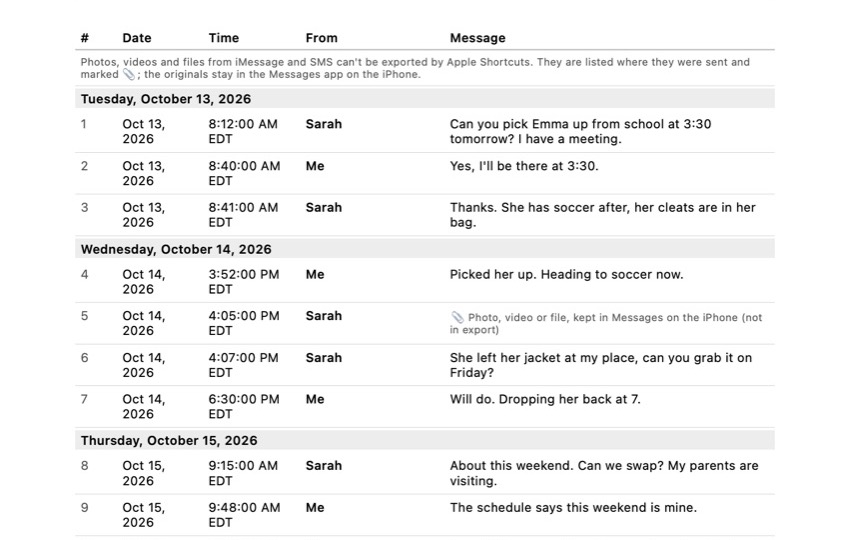
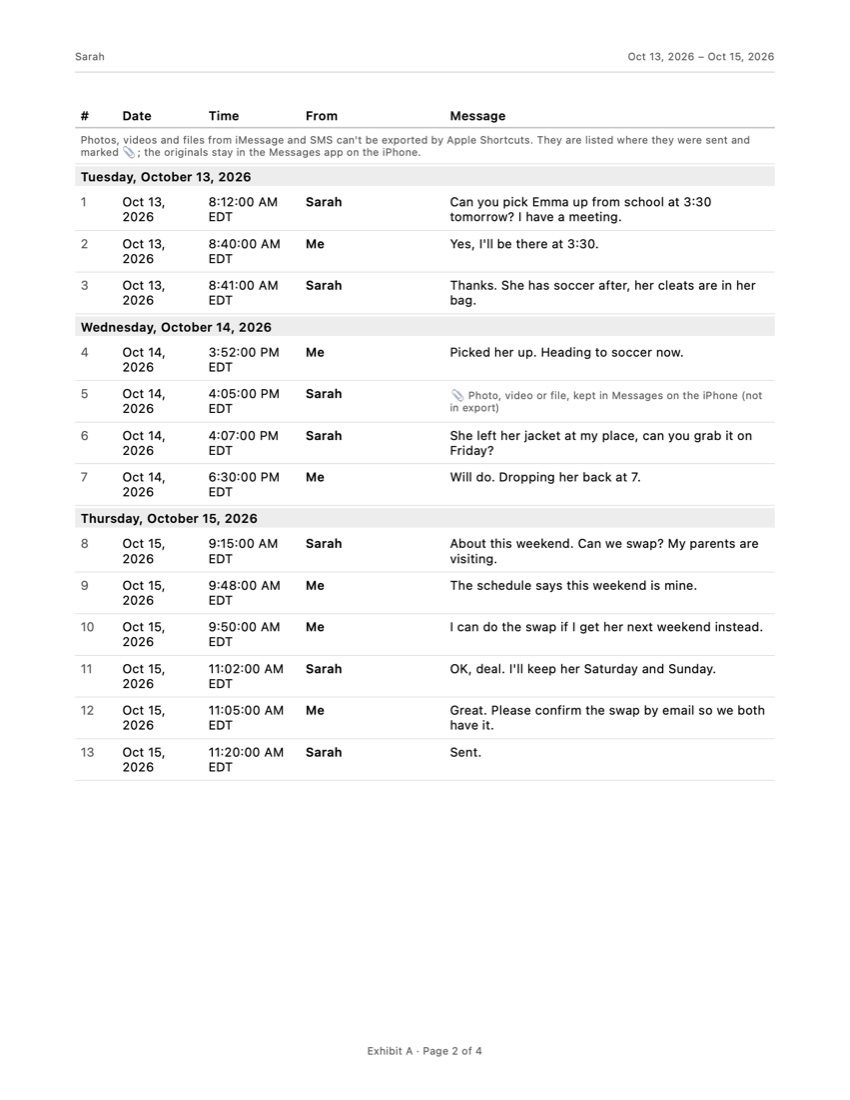
Turns one iMessage, SMS or WhatsApp conversation into a PDF with a numbered table of every message, its date, time and sender, the time zone, page numbers, and an integrity page with SHA-256 fingerprints so anyone can check the file did not change. Processed on your iPhone, not uploaded.
What Exhibit does not do
Give legal advice, decide what a court accepts, or export photos and videos from iMessage or SMS (it marks where each one was). It does not replace your lawyer, a subpoena or a forensic examination.
What a lawyer decides
Which messages to use, how to present them under your state's rules, whether the other parent's texts can be used against them, and what to do about messages you wish you had not sent.
What to keep
The phone itself, the original conversation, a backup, the exported copy, and notes with dates. If you get a new phone, transfer the messages first and keep the old one.
The problem
In a custody case the court looks at what is best for the child, and part of that is how the parents communicate and cooperate. When most of that communication is text, the conversation on your phone becomes a record of who showed up, who changed plans, who was calm and who was not.
That cuts both ways. The same thread holds your messages too. Courts and the other side’s lawyer will want to see the whole picture, not a few lines lifted out of it. The goal is not to collect the worst messages; it is to keep a complete, honest record that your lawyer can work with.
What can go wrong
- Cropped screenshots. A screenshot shows about 10 messages. Without swiping left in Messages, most bubbles have no time. A short selection invites the question “what came before and after?”
- Deleting messages. People delete their own harsh messages, or whole threads after a fight. The other parent still has them, and Messages in iCloud removes a deleted message from all your devices. Deleted texts stay in Recently Deleted for 30 to 40 days, then they are gone.
- Automatic deletion. If Keep Messages is set to 30 Days or 1 Year, the iPhone removes older texts by itself.
- A new phone. Switching phones without transferring the messages, or trading in the old one, loses the original.
- Showing only the phone. Courts generally want evidence they can mark and keep. California’s self-help guide, for example, tells people to print texts and bring three copies: one for you, one for the judge and one for the other side. Local rules differ, so check yours.
- Getting the other parent’s messages the wrong way. Logging in to their phone, iCloud or WhatsApp without permission can be illegal. Stick to what is on your own phone.
Checklist
- Stop deletion. Settings > Apps > Messages > Keep Messages: Forever. Our guide on how to save text messages on iPhone shows each step.
- Make a backup to iCloud or a computer, so a lost or broken phone does not take the messages with it.
- Save a copy of the whole thread, from the start of the period that matters until today, with the date, time and sender on every message.
- Save photos and videos sent in the conversation separately (touch and hold, then Save).
- Write a short timeline: dates of missed visits, late pickups, school events, and what was said, with a pointer to the message.
- Give everything to your lawyer, including messages that do not help you. Let them decide what to use.
- Keep the phone and do not reset it, even after the case.
- From now on, write as if the judge will read it. Short, polite and about the child.
Screenshots or a full export?
Screenshots are fine for one or two key exchanges, as long as the time shows on each message. For months of messages they become a pile of images: about 50 for 500 messages, each needing a swipe for the times, then sorting and printing, roughly an hour or more. On a Mac, Messages can print a conversation, but you need a Mac, have to scroll back to load older messages, and should check the preview for dates and times. Our guide on how to print text messages from an iPhone compares these ways in detail.
An export app gives you the complete thread as one document. With Exhibit you add the free shortcut once, pick the conversation and the period, and get a PDF on your iPhone, without a computer. Every message is numbered with its date, time and sender, the time zone is stated, and every page says “Page X of Y”. If you leave a message out, the cover page says how many were omitted, so nobody can say the record was quietly trimmed. The integrity page has SHA-256 fingerprints, so anyone can check later that the file did not change, and you can sign the declaration in the app or with a pen. Your conversations are processed on your iPhone and are not uploaded.
The honest limits: photos, videos and files in iMessage and SMS cannot be exported through Apple Shortcuts. The PDF marks where each one was, so save them separately. WhatsApp chats exported with media can show attachments. Exhibit is free to download, and it does not give legal advice or decide what a court accepts.
How do you show the texts are real?
Usually someone has to show the messages are what you say they are: that they came from the other parent’s number and were not changed. Under the federal rules (Rule 901), and similar rules in most states, that is often done by a person who sent or received the messages testifying about them, together with details such as the phone number, the replies and what the messages say. A complete thread with dates and times makes that easier to follow than scattered images, but whether the court accepts it depends on the court and your jurisdiction. Your lawyer, or your court’s self-help center if you do not have one, can tell you what your judge expects. If the custody question is part of a divorce, also read what to keep for text messages in a divorce.
Frequently asked questions
Can text messages be used in a custody case?
Often, yes. Family courts look at how parents communicate and cooperate, and texts are one of the most direct records of that. Whether a specific message is allowed depends on the court and your state's rules of evidence, and usually someone has to show who sent it. Your lawyer decides how to present them.
Should I delete my own angry texts?
No. The other parent has a copy, so deleting yours removes nothing from the case; it only makes your record incomplete and can look like hiding something. Keep everything and tell your lawyer about the messages you regret. How you communicate from now on matters too.
Are screenshots enough?
For a few messages they can be, if the date and time are visible on each one. The common problem is that a screenshot shows only a small part of a conversation, often without times, and it is easy to say something was left out. For a long thread, a complete export with every date, time and sender is easier to read and harder to dispute.
Can I take the other parent's phone to get their messages?
Do not. Getting into someone else's phone or accounts without permission can be illegal, and evidence gathered that way can hurt your case. Use the messages on your own phone, and ask your lawyer about formal ways to get records from the other side.
What if we use a co-parenting app?
Then those messages live in the app, not in Messages. Co-parenting apps usually offer their own records or reports, sometimes for a fee; check the app's help pages. Texts you exchanged before or outside the app still need to be saved separately.
Sources
Export the whole conversation
Exhibit turns an iMessage, SMS or WhatsApp conversation into one PDF with every date, time and sender, right on your iPhone. No computer, no account.
Get Exhibit, free download