Text messages in a divorce: what to keep and how to copy them
Years of texts with your spouse sit on your phone: about money, the house, the kids, the arguments. Now you are separating, and you wonder what those messages mean for the divorce, whether you should save them, and whether you are allowed to delete anything. The short version: keep all of it, and get a copy out of Messages.
Short answer
Do not delete texts with your spouse once a divorce is likely; the other side can formally ask for them, and gaps look bad. Set Keep Messages to Forever, check that your spouse cannot reach your messages through a shared Apple Account or iPad, and save a complete copy of the important conversations, with date, time and sender on every message. Give that copy to your lawyer, who decides what is relevant. What a court allows depends on your state.
On this page
Which way of keeping the texts fits a divorce?
 ExhibitExhibitPDF, CSV or TXT
A computer backup protects everything but cannot be read without restoring a phone. For the conversations that matter, add an export: about 5 minutes per conversation instead of an hour or more of screenshots, and easy to repeat later for a new period.
Export the conversation with Exhibit
What to do now
Stop automatic deletion, check which devices are signed in to your Apple Account, and make a copy of the conversations with your spouse that touch money, property, the children or threats.
What not to rely on
Your spouse's copy, the phone company (carriers often keep only who texted whom and when, not the words), a few screenshots, or the hope that the messages will still be there in six months.
What Exhibit does
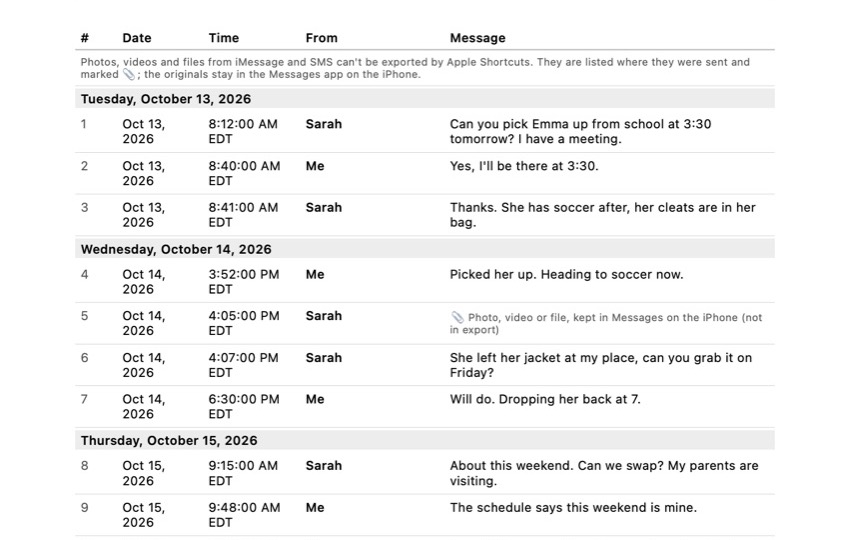
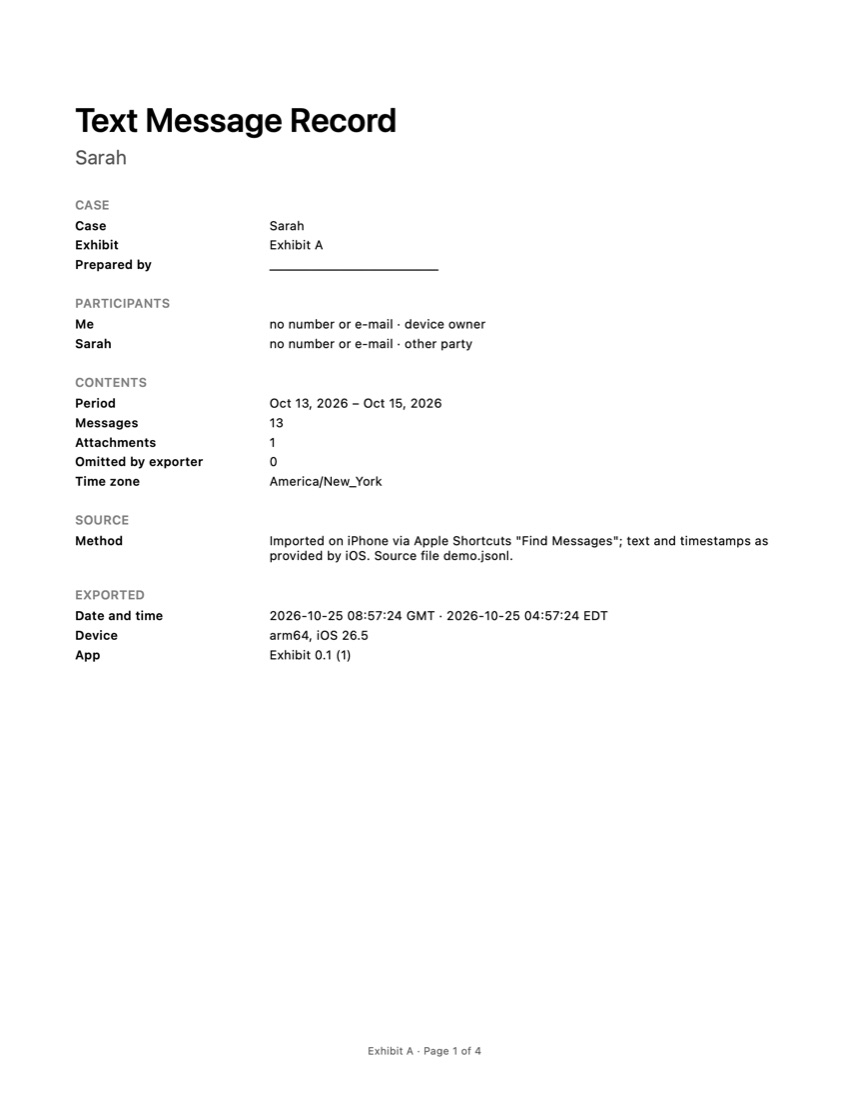
Exports one iMessage, SMS or WhatsApp conversation for a period you choose to a PDF, CSV or TXT file on your iPhone. The PDF shows every message's date, time and sender, the time zone and page numbers, and has an integrity page with SHA-256 fingerprints. Processed on your iPhone, not uploaded.
What Exhibit does not do
Give legal advice, judge what is relevant, get messages from your spouse's phone, or export iMessage and SMS photos and videos (the PDF lists where each one was).
What a lawyer decides
What has to be handed over in discovery, which messages help or hurt, whether texts about an affair matter in your state, and how to present messages at a hearing.
What to keep
Your phone, a backup, the exported copies with the date you made them, and a list of which conversations you saved and why.
The problem
In a divorce, texts between spouses are often the clearest record of what was agreed and what happened: who paid what, promises about the house or the car, plans for the children, threats or harassment. They can help you, and your own messages can be used against you.
Two things make texts tricky in a divorce. First, the other side can formally ask for them in discovery, the stage where both spouses exchange documents and answer questions under oath. California’s and Washington’s self-help guides both describe this process, and electronic records such as messages are part of it. Second, many couples share an Apple Account, an iPad or a Mac, which means your spouse may be able to see, or delete, your messages.
What can go wrong
- Deleting “just the bad ones”. Once a divorce is likely, deleting relevant messages can be treated as destroying evidence. Your spouse usually has the same conversation anyway.
- A shared Apple Account. With Messages in iCloud, a message deleted on any signed-in device disappears everywhere. If your spouse uses an iPad or Mac signed in to your account, they can read new messages and delete old ones.
- Automatic deletion. Keep Messages set to 30 Days or 1 Year removes older texts by itself, on every synced device.
- Relying on the carrier. Phone companies often do not store the content of texts, only who sent them and when.
- Only screenshots of the worst moments. A few images without dates leave out the context, and the other side will supply their own.
- Reading your spouse’s phone. Logging in to their phone, email or iCloud without permission can be illegal, even when you know the passcode.
Checklist
- Stop deletion: Settings > Apps > Messages > Keep Messages: Forever. Our guide on saving text messages on iPhone walks through it, including backups.
- Check who can reach your messages: Settings > Privacy & Security > Safety Check lets you review the devices signed in to your Apple Account and stop sharing. If you are in danger, contact a domestic violence hotline before changing settings that the other person might notice.
- Make a backup to a computer you control. It is a snapshot of how the phone was on that day.
- List the conversations that matter: your spouse, and anyone else about money, property or the children.
- Save a complete copy of each, for the full period, with dates, times and senders.
- Save photos, receipts and screenshots of payments from those conversations separately.
- Hand everything to your lawyer and let them decide what is relevant and what must be produced.
- Text less, and calmly, from now on. Assume a judge will read it.
Saving a copy you can hand over
Messages on the iPhone has no export button, and screenshots get unwieldy fast: a screen holds about 10 messages, so 500 messages is about 50 screenshots, each needing a swipe for the times, then sorting and printing, roughly an hour or more. Our guide on downloading text messages from an iPhone compares the options in detail.
Exhibit exports one conversation at a time, on the iPhone, without a computer. You add the free shortcut once, choose the conversation and the period, and get a PDF, a CSV or a TXT file. The PDF numbers every message with its date, time and sender, states the time zone, puts “Page X of Y” on every page and ends with an integrity page with SHA-256 fingerprints, so anyone can check later that the file was not changed. The CSV is handy when a lawyer or accountant wants to search or sort messages about payments. Because you pick the period, it is easy to export again later for the months since. Your conversations are processed on your iPhone and are not uploaded.
The limits: photos, videos and files in iMessage and SMS cannot be exported through Apple Shortcuts, so the PDF lists where each one was and you save them separately. Exhibit is free to download. It does not give legal advice and does not decide what a court accepts.
What kind of texts tend to matter?
That depends on your state and on what is disputed, so treat this as a list of things to mention to your lawyer, not a rule:
- Money: agreements about loans, support, who pays the mortgage, large spending, or hiding or moving money.
- Property: promises about the house, cars or belongings.
- Children: schedules, missed visits, decisions about school or health. If custody is disputed, those messages need extra care; see text messages in a custody case.
- Threats or harassment: keep the whole conversation and the dates, and tell your lawyer right away.
Whether any of it is used, and how, is up to the court and the rules where you live.
Frequently asked questions
Can my spouse's lawyer ask for my text messages?
Yes, in many divorces. Through discovery, each side can ask the other for documents, and state self-help guides list text messages and other electronic records among them. You answer under oath, so a missing conversation can become a problem. Ask your lawyer what you have to hand over.
Can I delete texts before the divorce is filed?
Do not, once a divorce is likely. Deleting messages that may be relevant can be treated as destroying evidence, and courts can hold that against you. Your spouse may also still have the same conversation. If there are messages you are worried about, tell your lawyer instead.
Do texts about an affair matter?
It depends on your state. In no-fault divorces the reason for the split often matters little, but messages can still touch on money spent on someone else or on the children. Your lawyer can tell you whether they are relevant in your case.
Can I get my spouse's messages from the phone company?
Usually not the words themselves. Carriers often keep records of who texted whom and when, not the content, and getting even those normally takes a subpoena through your lawyer. Never log in to your spouse's phone or accounts without permission.
Should I save texts with other people too?
Only when they relate to the divorce, for example messages with a family member who lent you money, or with your spouse's new partner about the children. Save the whole conversation for the period that matters, not single lines.
Sources
Export the whole conversation
Exhibit turns an iMessage, SMS or WhatsApp conversation into one PDF with every date, time and sender, right on your iPhone. No computer, no account.
Get Exhibit, free download